Suppose we have lost all the datafiles, logfiles and even control file and parameter file is also lost.
This usually happens when the Primary Disk is damaged
Then to recover the database from this kind of failure we need to do disaster recovery or full database recovery
Assumption
- All datafiles and logfiles are lost
- The database was running in Archivelog mode
- Control file and SPFILE is also lost
- RMAN backups of the database is available
- We were not using RMAN with recovery catalog
To restore and recover the database do the following
Step 1
If you have lost the primary disk where O/s and Oracle was installed. Then, install a new disk and format and install the same operating system and same version of Oracle database software which was install before failure
Step 2
Make sure RMAN backups are available and also make sure archive log files of this database are also accessible
Start RMAN by typing the following command
$ export ORACLE_SID=test
$ rman target / nocatalog

Now the most important thing we need to do now is to set the database ID (DBID) at RMAN prompt. The DBID uniquely identifies the database.
If you have already noted down the DBID of the database then you can straight forward type the DBID at the RMAN prompt.
Otherwise if you have not noted down the DBID then the other ways you can get the DBIDx is
- If you have turned ON the autobackup of Controlfile and
configured the AUTOBACKUP filename to contain the DBID then you can
look into the directory where Controlfile AUTOBACKUP files are
located. Usually the directory set with the path
DB_RECOVERY_FILE_DEST parameter. The control files auto backup files
will have the DBID in the format
c-IIIIIIIIII-YYYYMMDD-QQ
Where
-
IIIIIIIIII stands for the DBID.
-
YYYYMMDD is a time stamp of the day the backup is generated.
-
QQ is the hex sequence that starts with 00 and has a maximum of FF.
-
- If you have ever recorded the output of RMAN session previously
then you can look into that output text file. The RMAN will always
show the DBID when it is connected to the database as shown below
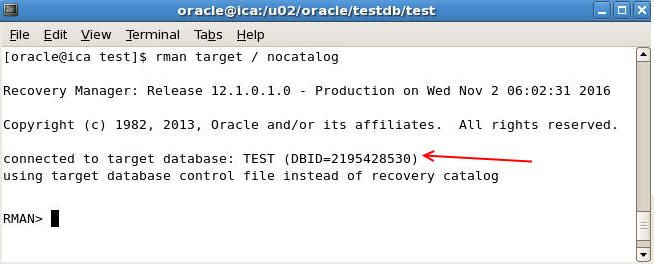
Once you got the DBID then set it by typing the following command
RMAN> set dbid=2195428530
